To make image attachments smaller, decide how the recipient will use them before choosing a target. For images meant to be viewed in an email, a 1600px maximum width and a few hundred kilobytes per image is a practical starting point. Compress the originals in one batch, inspect each result, and send a ZIP only when the recipient expects an archive.
In our three-file test, 3,910,559 bytes of PNG and JPG images became 381,034 bytes. PicZip packaged those outputs into a 381,092-byte ZIP. That is a 90.26% reduction in the image data, but the best delivery format still depends on whether the recipient wants quick previews or a single downloadable bundle.
Our three-image email test
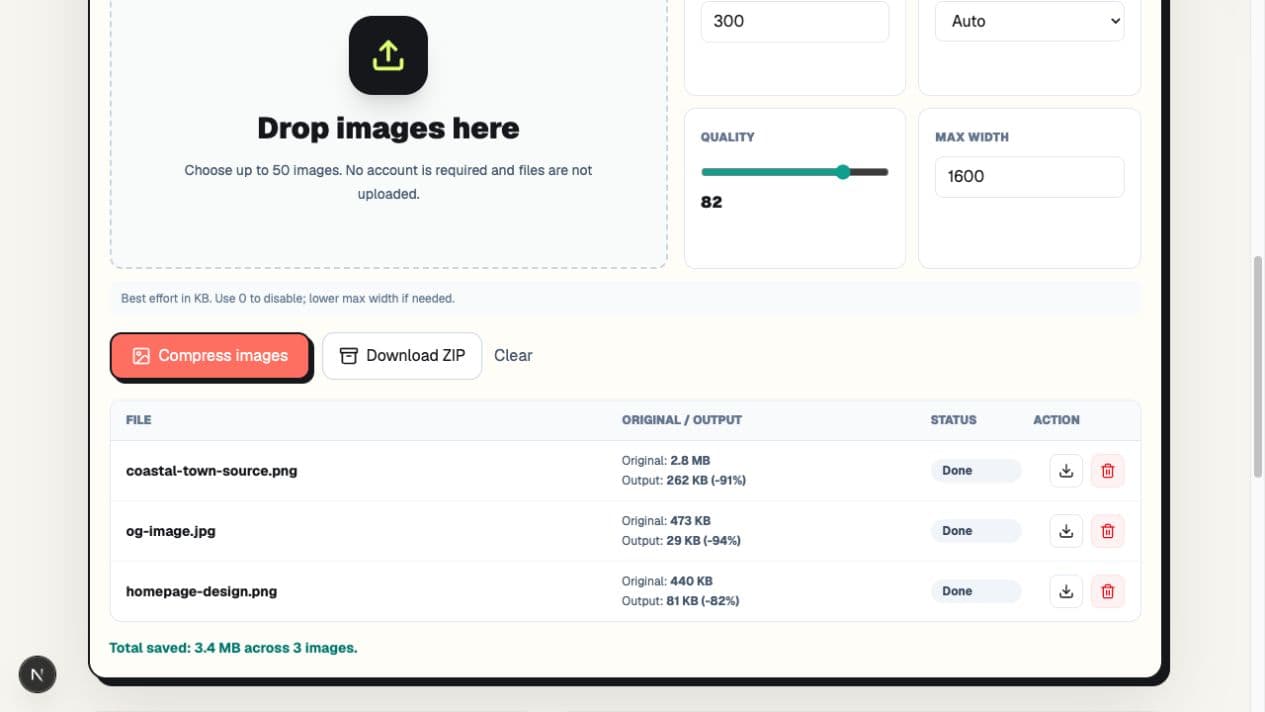
We used three PicZip-owned, privacy-safe files: a detailed coastal PNG, the PicZip social preview JPG, and a PNG homepage mockup. This mix covers a photograph-like scene, branded artwork, and interface text. The files were 2,976,317, 483,929, and 450,313 bytes before compression.
We set Target size to 300KB, Output to Auto, quality to 82, and Max width to 1600px. The 300KB value was a per-file ceiling, not a promise that every output would be close to 300KB.
| File | Original | Output | Dimensions |
|---|---|---|---|
| Coastal PNG | 2,976,317 B | 268,434 B | 1536×1024 |
| Social preview JPG | 483,929 B | 30,022 B | 1376×768 |
| Homepage mockup PNG | 450,313 B | 82,578 B | 1440×1200 |
Auto selected WebP for all three outputs. Their combined size was 381,034 bytes. The ZIP was only 58 bytes larger because WebP data is already compressed; ZIP is valuable here for packaging, not for a second dramatic reduction.
Step 1: Choose a useful attachment budget
Mail services do not all use the same limit, and encoded email attachments can take more message space than their file sizes suggest. Avoid aiming exactly at a provider's advertised maximum. Leave room for the message body, signatures, PDFs, and any images added later.
For photos the recipient will only view on a laptop or phone, start with 1600px maximum width and 200–500KB per image. For print, original artwork, or a client who needs to edit the file, do not use an email-viewing preset; share the originals through an agreed file-transfer method instead.
Step 2: Add the originals and use one batch setting
Open PicZip's batch image compressor and add the original files. In our test, one 300KB target and 1600px maximum applied to the whole batch. Starting from originals matters: repeatedly compressing images that have already been reduced can add artifacts without a useful size benefit.
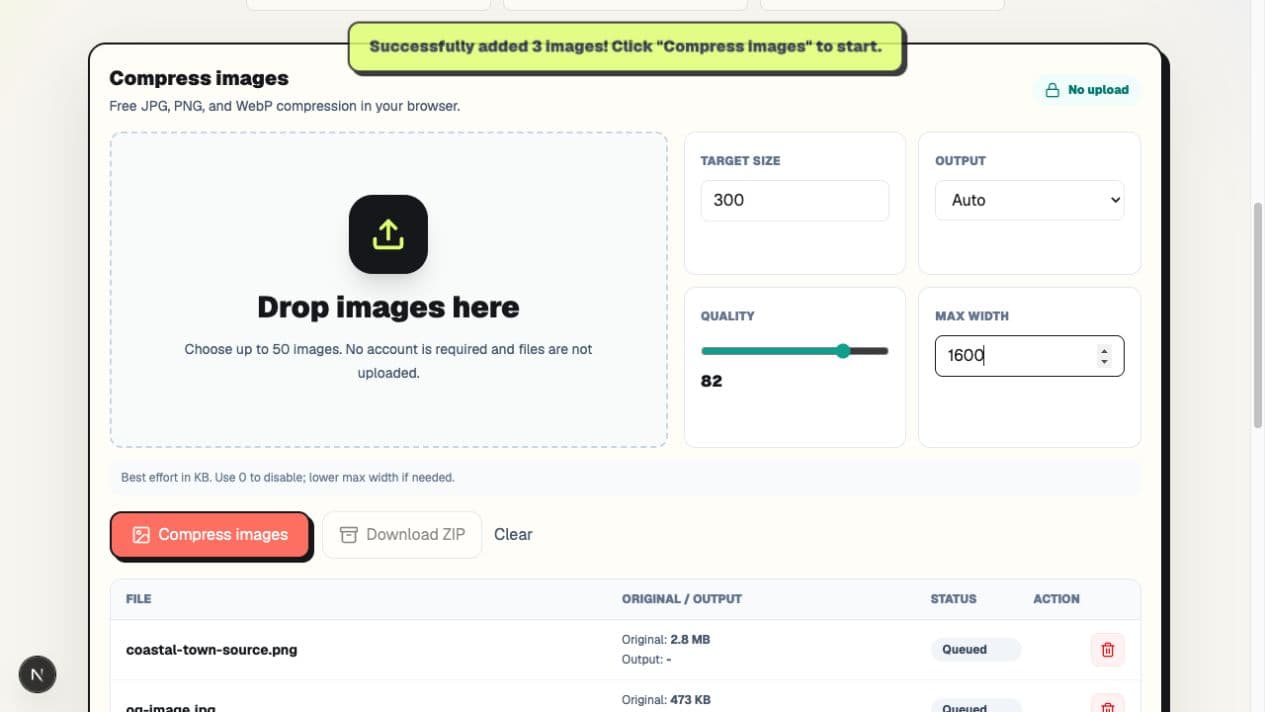
A single batch setting is efficient, but it does not make every image equally large. The social preview needed only 30,022 bytes, while the detailed coastal image used 268,434 bytes. Content complexity and source format matter more than filename or original size alone.
Step 3: Review each result before downloading
Wait until every row reports Done. Check screenshots at 100% zoom for readable text and check photographs for faces, fine edges, and obvious color banding. A batch can contain one file that needs a different format or width, so do not judge all outputs from the total saved number.
Individual attachments or one ZIP?
Attach images separately for quick viewing
Individual JPG, PNG, or WebP files are easier to preview on phones and in webmail. Use them when the recipient needs to glance at a few images, insert them into a document, or download only one file. Confirm that the recipient's software accepts WebP; otherwise choose JPG for photographs before compressing.
Use ZIP for a named set of files
ZIP is convenient when several files belong together, filenames matter, or the recipient asked for one package. In our test it added 58 bytes rather than reducing the batch further. Some organizations block archives for security reasons, and a phone user may find them less convenient to open.
PicZip's Download ZIP button is therefore an organization feature, not a claim that already-compressed images will become much smaller again.
Format choices for email
Use JPG for broadly compatible photographs. Use PNG when transparency or hard-edged screenshot text matters and the resulting size is acceptable. WebP often creates smaller outputs, but the recipient's editing software or upload workflow may not accept it.
See the dedicated JPG compressor and PNG compressor when format compatibility matters more than Auto's smallest result.
Frequently asked questions
What size should a photo be for email?
There is no universal number. For screen viewing, 1600px wide and a few hundred kilobytes is a sensible starting point. Printing, editing, and archival delivery need larger files.
Why is the ZIP almost the same size as the images?
JPG and WebP data is already compressed. ZIP can package those files, but it often cannot remove much more data. Our 381,034-byte batch became a 381,092-byte ZIP.
Can I email WebP files?
Usually, but the recipient's software may not preview or edit them. Choose JPG when broad photo compatibility matters, and use PNG for screenshots that need transparency or very crisp edges.
Are the images uploaded while PicZip processes the batch?
No. The selected image files are decoded and compressed in the browser. Normal page assets still load from the web; the “no upload” claim applies to the images selected for compression.
The practical workflow
Start from the original images, choose a width based on how they will be used, and leave margin below the email service's limit. Inspect every result. Send individual files when previews matter, or a ZIP when the recipient wants one organized package.
Our test reduced three mixed images by 90.26%, but that figure is evidence from one batch, not a guarantee. Open the PicZip batch compressor and measure the files you actually plan to send.